
Our own tool · Unity Asset Store
Easy Chapter Generator: linear chapters and objectives for Unity
Our tool for the Unity Editor. It organises a game's progression into chapters and objectives that always advance the same way, flags setup mistakes before you hit Play and lets the rest of your game drive it from C#.

- 1.0.0 released on 25 September 2026
- Unity 6.3 LTS the listed version: 6000.3.20
- 7 objective components included
- EN + ES full documentation, offline too
The product
What Easy Chapter Generator is and who we built it for
It's a system of ordered chapters and objectives for Unity, with its own Editor window and a C# API. We developed it at OverFuture and published it on the Unity Asset Store.
Many games and experiences move in a straight line: first this, then that. A tutorial, a mission, an escape room, a VR training session. When that sequence is scattered across scripts, nobody knows which step the player is on or why they're stuck.
Easy Chapter Generator keeps progression separate from everything else. A ChapterManager picks the active chapter; each chapter has its objectives in order; and each objective holds its identity, conditions, actions and state. Scene components, UnityEvents or your own code detect what happens in the game and request the objective's completion. Dialogue, inventory, movement, camera and saving stay yours.
Need a Unity tool or game? Tell us your idea
We reply within 24 business hours.
- Type
- Unity Editor extension
- Demo
- Playable, Built-in Render Pipeline
- Core
- Render pipeline independent
- Package
- 69.6 MB, 281 assets
The trailer
A chapter from start to finish in a minute
In the trailer, an objective is added, its start action is set up, a scene button is linked without typing a single ID, and the Editor flags what's missing. Then the demo is played: a timer, a zone to reach and the end of the chapter.
No cookies or requests to YouTube until you press play.
 (opens in a new tab)
Challenge 1 · A flow that always advances the same way
Ordered objectives that are never skipped or completed twice
In a linear sequence, the worst bug is the one you can't see: an objective completed too early, one counted twice or a step that gets stuck. That's why the flow is deterministic. The chapter activates, the first objective that can start activates, and only once it's completed, skipped or failed does the next one start.
Chapter 01 · Control room
Active
- Use the consoleButtonObjective · chapter_01_consoleNot Started
- Place the battery in its holderObjectPlacementObjective · chapter_01_batteryNot Started
- Start the generatorTimedObjective · Required True State: generator_unlockedNot Started
- Reach the exitWalkToObjective · chapter_01_exitNot Started
› The chapter is active and “Use the console” is the active objective. Press “Complete the active objective” or try completing another one.
An on-page simulation using the tool's real API and component names; in a game, the completion request comes from the scene component or your code.
Want a system like this in your game? Tell usCode can only complete the active objective, and only with its exact ID: chapter.. If the chapter isn't active, the objective isn't the current one or the ID is off by a single character, it returns false and nothing happens. Repeated requests are ignored too.
An objective can depend on a fact in the game. With Required True State, the generator only starts if generator_unlocked was saved beforehand; if not, the objective is marked Skipped and the chapter carries on. And failure is explicit: the game calls TryFailCurrentChapter(), the tool fires C# events and UnityEvents, and you decide what happens next. It never reloads scenes on its own.
- Result
- You always know which chapter and objective the player is on, and why they've moved on.
- For your project
- Progression that doesn't depend on script execution order or on how many times a signal arrives.
Challenge 2 · Errors before you play
Validation that catches setup errors before you hit Play
Most bugs in a sequence aren't in the code: an empty ID, two detectors pointing at the same objective, a component linked to the wrong chapter. The validation panel checks the Manager, the chapters, the objectives, their scene links and the transitions, and separates errors from warnings.
Press “Refresh” to check the chapter.
- ErrorIdentity An objective has an empty identifier.
- ErrorObjective Link Two scene components are linked to the same objective.
- ErrorComponent setup A WalkToObjective has no trigger collider.
- WarningCompletion path An objective has no actions and no detector in the scene.
- WarningTransition The chapter ends with “Load Scene” but has no target scene.
The five categories are the tool's own. A clean validation pass doesn't run the game's physics or code: the final test still happens in Play Mode.
Each issue takes you to the exact object: double-click it to select it in the Hierarchy and fix it there. The repair loop is short on purpose: refresh, fix the first error, refresh again and check that nothing new has appeared.
So that you never have to type IDs by hand, each component's Inspector has an assisted picker: choose the chapter and the objective, and the tool marks the link as Linked. Everything you do in the window supports Undo/Redo.

- Result
- Authoring errors show up in the window, with the object highlighted, instead of turning into an objective that won't advance halfway through a playthrough.
- For your project
- An Editor tool that validates as you work saves you manual testing after every content change.
Challenge 3 · Changing scenes
Change scenes without losing track of the chapter
When a chapter ends, the game can carry on in another scene. The classic problem is that the new scene starts from its default chapter and the player ends up “back at the start”.
Easy Chapter Generator writes a one-time note, the handoff, with the chapter (and, if needed, the objective) to continue from. The target scene reads it, checks that the chapter exists, clears it and carries on from there. If there's no handoff or it isn't valid, the scene uses its default chapter.
| On completion | Loads scene | What it writes |
|---|---|---|
| None | No | Nothing: your game decides |
| Load Scene | Yes | Nothing: the default chapter starts |
| Load Scene And Start Chapter | Yes | The target chapter |
| Restore Checkpoint | Yes | The target chapter and objective |

- Result
- A reload or scene change resumes from the configured point, and the handoff isn't consumed again on a later reload.
- For your project
- Scene- or level-based games that keep their place without a full save system.
Challenge 4 · Save only what's needed
Save progression without replacing your game's save system
A progression tool that tries to save everything ends up clashing with the game's save system. This one only saves its own data and leaves the rest to your project.
What it saves
- Completed and skipped objectives
- Finished chapters
- Named states, such as
generator_unlocked - The one-time handoff for changing scenes
What it doesn't save
- Scenes, objects or positions
- Inventory or dialogue variables
- Health or the game's own data
- An active or failed objective: it starts again
By default it uses PlayerPrefs, with keys separated by scope and profile. If the game already has its own storage, you can swap it in through the IProgressStore interface before progression starts.
Writing, committing and clearing are separate operations: SetProgressState writes a state, FlushProgress() commits pending changes when the game decides to, and ClearProgress() clears only what the tool knows about.
- Result
- Progression is restored when the game is reopened, and all other data stays in each project's own save system.
- For your project
- Each system saves its own data: less duplication and fewer save files that break after an update.
The tool from the inside
Screenshots of the Editor window and the demo
These are the images from the official listing, showing the tool's real interface. Click or tap to enlarge.
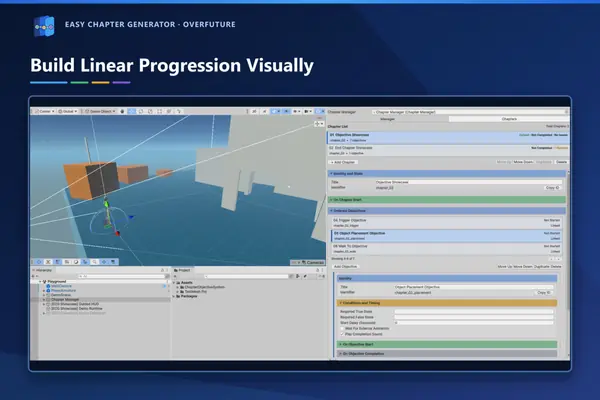
Progression, in the Editor window. 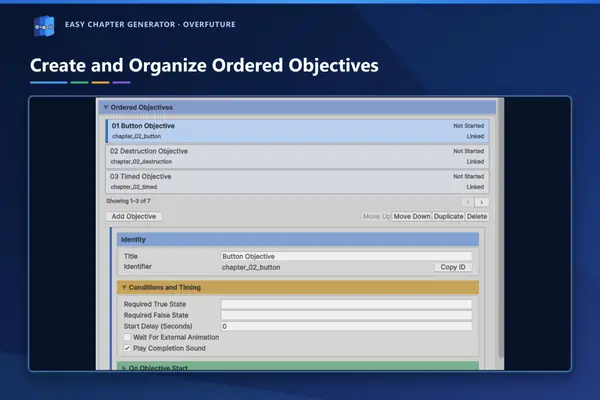
Ordered objectives, with their identity and conditions. 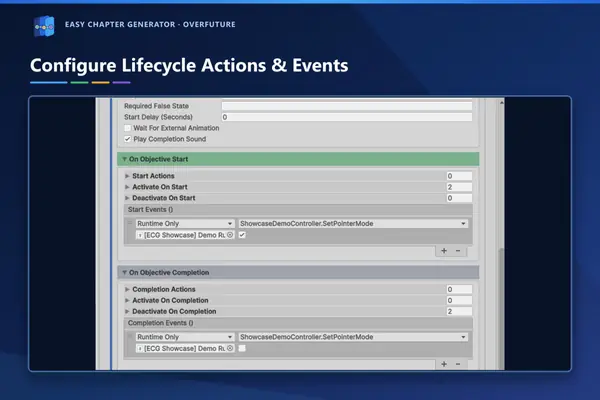
Actions and events on start and completion. 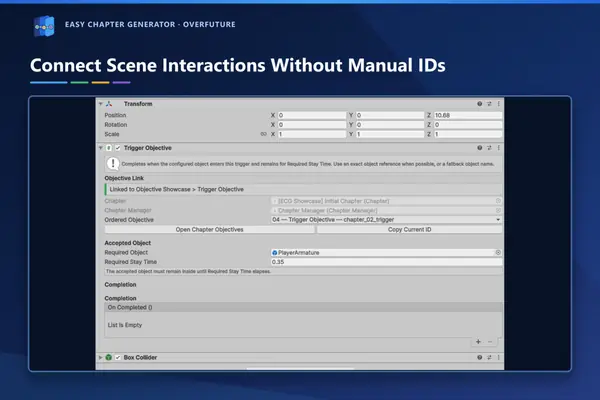
Scene linking, with no hand-typed IDs. 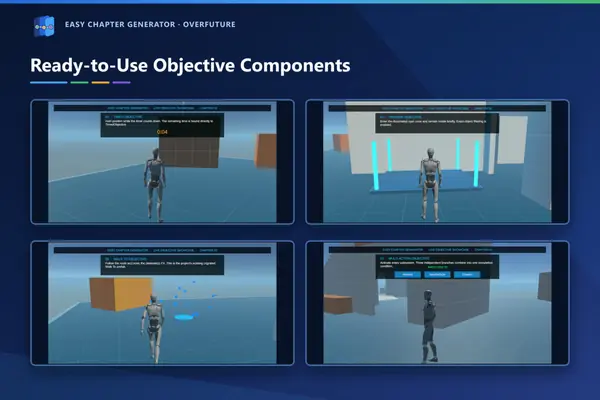
Ready-to-use objective components. 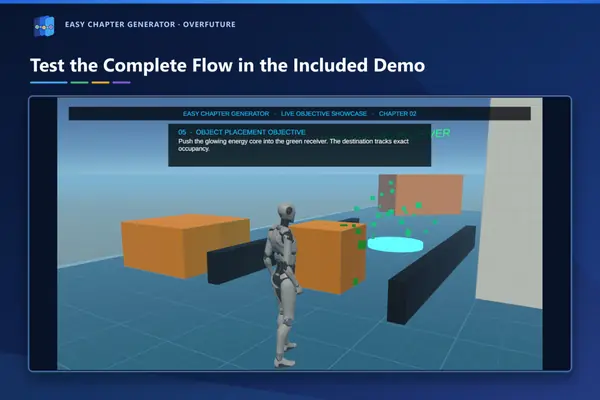
The included playable demo (Built-in Render Pipeline). 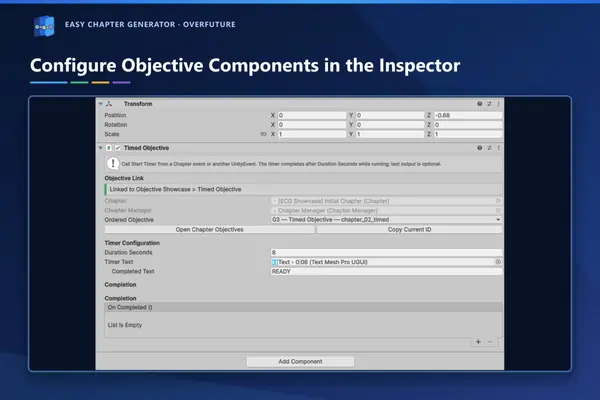
Each component is set up in the Inspector. 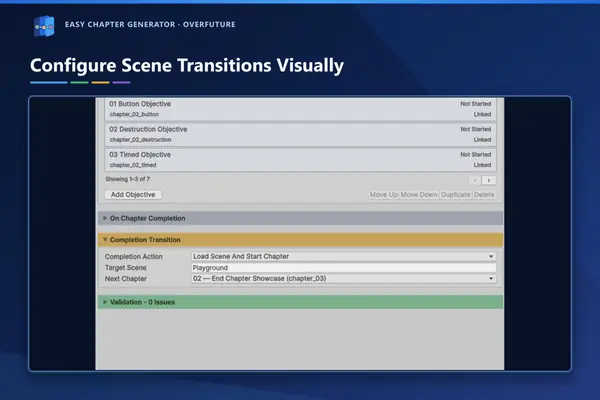
Scene transitions, in the chapter's row. 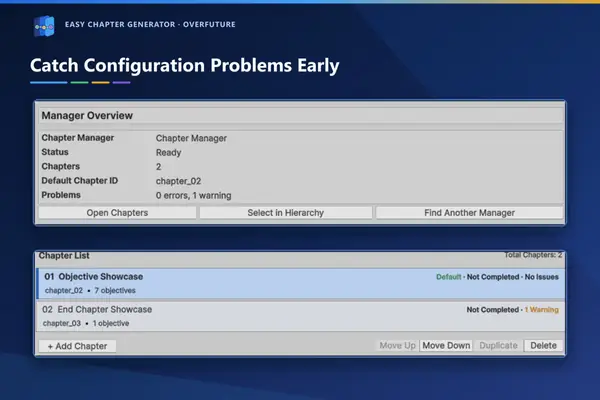
Validation in the Manager window.


The result
A published, documented Unity tool with its own demo
- Published on the Unity Asset Store. Released on 25 September 2026 as an Editor extension.
- Documented in two languages. Inside the package and online, with getting-started guides, a component reference and C# examples.
- With a playable demo. Made for the Built-in Render Pipeline, it walks through the included components.
- Built with AI assistance and reviewed by hand. ChatGPT and Codex as assistants for review, testing and documentation, with everything validated in the real Unity project.
FAQ
What people ask us about Easy Chapter Generator
Who developed Easy Chapter Generator?
OverFuture, a software and video game development company in Zaragoza, Spain. It's our own tool, published on the Unity Asset Store.
Which Unity version does it work with?
The Asset Store listing states Unity 6.3 LTS (6000.3.20). The demo targets the Built-in Render Pipeline; the core doesn't use any pipeline-specific API, but the listing doesn't declare URP or HDRP compatibility for the full package.
Does it replace my quest or save system?
No. It only handles progression: chapters, objectives, their order and their state. Dialogue, inventory, movement and saving stay in your project and connect through UnityEvents, the public API or small adapters.
Can I create my own objectives?
Yes. As well as the included components (Trigger, Button, Timed, Destruction, Object Placement, Multi Action and Walk To), you can inherit from the Objective base class and request completion when your condition is met.
Where is the documentation?
Inside the package, for offline use, and online in English and Spanish at overfuture.dev/easychaptergenerator (opens in a new tab).
Can you build a custom Unity Editor tool?
Yes. Based in Zaragoza, we develop Unity tools, systems and video games for studios and companies. Easy Chapter Generator is our own product and shows how we work.
How much does it cost to develop a Unity tool or game?
It depends on the scope. Our gamification and video game projects start at €2,000, excluding VAT. The final price depends on the features, content, platforms and documentation you need.
We build Unity tools and games in Zaragoza
- Unity games (ES)For mobile, PC, web and virtual reality. (opens in a new tab)
- Game development (ES)Commissioned work for brands, studios and companies. (opens in a new tab)
- How was it made? (ES)The tool's story, on our blog. (opens in a new tab)
- Project page (ES)Easy Chapter Generator in our projects. (opens in a new tab)
The official product pages: in English (opens in a new tab) · en español (opens in a new tab) · Unity Asset Store listing (opens in a new tab).

Got a game or a tool in mind?
Tell us what you need: a mechanic, an editor for your team or a project you want to finish. We'll suggest a way to get started.
comercial@overfuture.dev · +34 617 36 31 92
We reply within 24 business hours.